


Instead of sending guests a ring link and tracking their replies, add your engagement ring to your Zola registry using its external-store gift feature; use a cash fund when the custom design is still being decided. For a Balacia ring, keep the registry entry tied to the exact design you want, not an inspiration photo that leaves guests guessing.
- To add engagement ring to Zola registry, use an external-store gift entry for a finalized design.
- Choose a Zola cash fund when your custom engagement ring details are still undecided.
- Balacia offers custom engagement ring options for couples who want a personalized design.
- Preview the guest experience before sharing; a registry listing is not a custom jewelry order.
Why this matters
An engagement ring carries choices that a registry photograph cannot explain: ring size, stone type, metal, setting, and any agreed customization. Your guests should not have to make those decisions for you.
Balacia is best for couples seeking engagement rings with custom design options. Zola serves a different purpose: organizing how guests give. Keep those roles separate so a thoughtful contribution does not become an unintended jewelry order.
For your 2026 registry, choose between a specific ring listing and a contribution fund before adding anything. The right route depends on whether the ring is ready to order, not simply whether you have found a photograph you love.
Before you start
- Registry access: Sign in to the Zola account that manages your registry. Use a desktop browser for the external-store browser-button workflow, and follow Zola’s current installation instructions for Add to Zola.
- A clear ring brief: Gather the exact product page, confirmed ring size, intended stone type, metal preference, and any written customization details. Keep private design correspondence outside the public registry.
- The easily missed gotcha: A public product page does not communicate a private custom design agreement. If your ring exists only in messages, sketches, or a design discussion, use a contribution fund rather than presenting a reference listing as the finished ring.
Do not upload account details, payment information, or private correspondence to explain the design. A short guest-facing description should tell people what their gift supports without exposing your order information.
Choose your registry route
Both routes can support an engagement-ring gift, but they solve different problems. Use a specific listing for a settled choice; use a cash fund for a design that still needs decisions.
| Registry route | Best for | Main advantage | Main limitation |
|---|---|---|---|
| External-store gift entry | Couples with a finalized ring and a usable product page | Shows guests the intended ring and its retailer | A general product page does not capture private customization instructions |
| Cash fund | Couples still choosing the stone, setting, or other custom details | Keeps the jewelry order under the couple’s control | Guests contribute toward the ring rather than selecting the exact piece |
Neither route replaces confirming the design with the retailer. Before publishing your 2026 registry, decide who will place the jewelry order and who will approve its details.
Set up your ring reference
- Choose the exact destination. Open the product page for the ring you intend to receive. Do not use a collection page or search results when a specific ring is the gift.
- Separate inspiration from instructions. Write down which details shown on the page match your intended ring and which details require customization. Keep this as your private ordering reference.
- Confirm the design stage. If you are still reviewing a custom ring CAD design mockup, distinguish that design work from the finished engagement ring. Do not label a design-service entry as though it were the completed jewelry.
- Choose the ordering person. Agree whether you, your partner, or a guest will place the order. For a custom piece, keep approval responsibility explicit rather than assuming the registry handles it.
Expected result: You have one clear ring reference, a record of the intended details, and an identified person responsible for ordering.
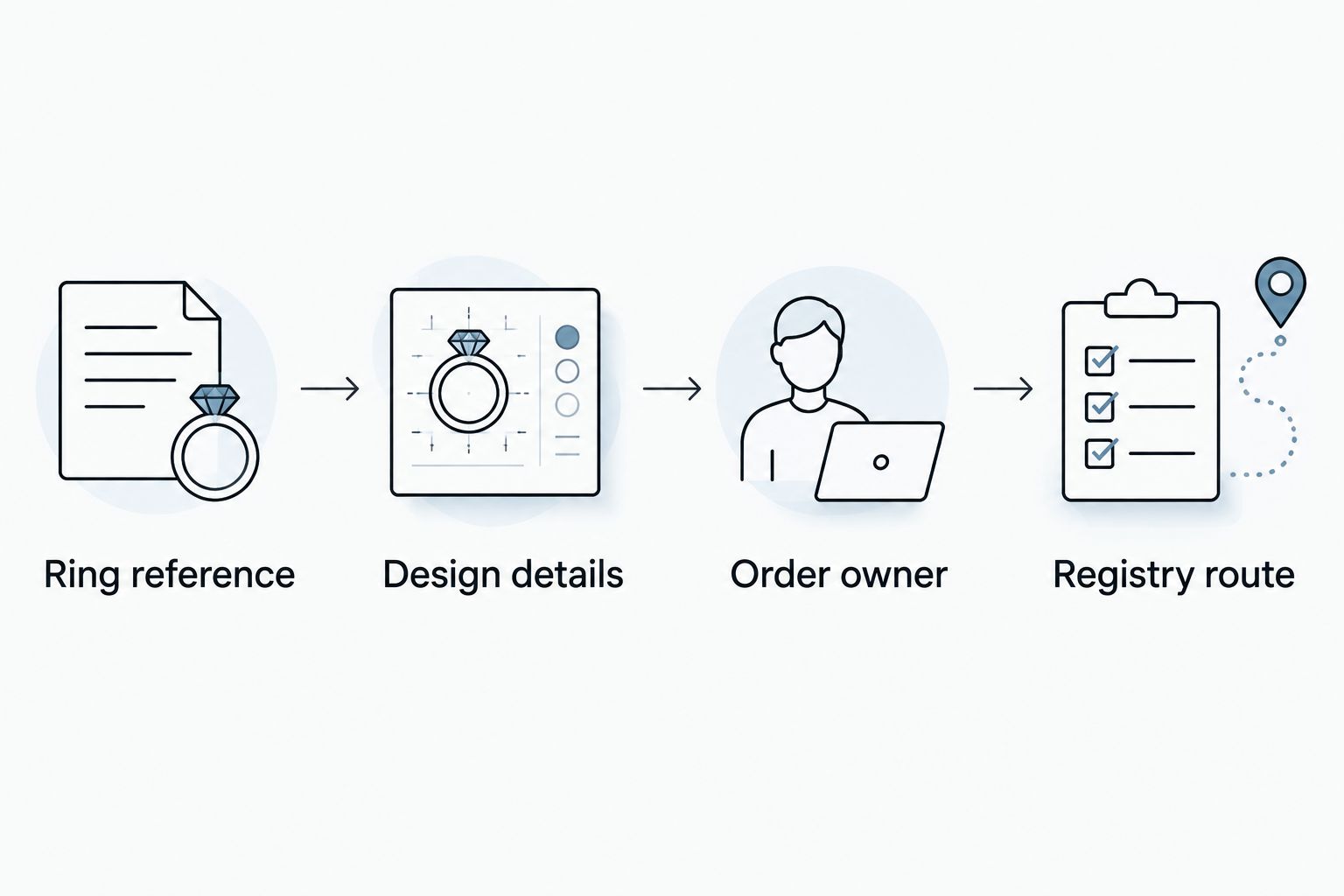
Your private ring brief
Keep these headings in a shared note: Ring reference, Design details, Order owner, and Registry route. Under design details, record only confirmed choices; leave unresolved questions visibly unresolved.
This brief is useful even when the ring is a surprise to guests. It keeps the practical decisions between the people who need to make them, while the registry can stay warm and simple.
Configure the external-store gift entry
Use this workflow when the product page represents the ring you actually intend to order. The browser button helps create the registry entry; it does not approve a custom design.
- Open Zola’s current browser-button instructions. Install Add to Zola using the instructions provided within Zola. Use the supported browser identified there rather than assuming every mobile browser works the same way.
- Return to the ring’s product page. Make sure you are viewing the intended item, not a design mockup, unrelated variation, or saved image.
- Select Add to Zola. Activate Add to Zola from your browser. Review the item information presented by the tool instead of accepting the captured details without checking them.
- Review the guest-facing information. Check the title, image, destination, and any description you can edit. If the photograph is only a reference for customization, say so plainly or switch to the fund workflow.
- Complete the entry using Zola’s on-screen controls. Read the purchase or contribution choices shown in your account. Do not assume an external-store entry has the same checkout process as an item sold directly through Zola.
Expected result: Your registry contains an entry that identifies the intended ring and points guests toward the correct gift route.
For a custom engagement ring in 2026, the most useful description is specific about responsibility. Explain whether guests are viewing a finished selection or contributing toward a design you will order yourselves. Avoid wording that invites guests to choose the stone or size.
Verify the guest experience
- Open the public registry view. Review the entry as a guest would see it, rather than relying only on the editing screen.
- Follow the gift action. Check where the entry sends a guest and what the next screen asks them to do. Stop before completing a purchase or contribution.
- Compare the destination with your brief. Confirm that the ring reference and the intended buying route match the decisions you recorded earlier.
- Review the description on another device. Read it on a phone as well as a desktop. Check that the explanation remains understandable without opening private messages or contacting you.
Expected result: You can explain the entire guest journey in one sentence, including who ultimately orders the ring.
Use 3 checks before sharing: the correct destination, an accurate description, and a clear ordering responsibility. Make 2 previews, one on desktop and one on mobile, and maintain 1 active ring entry unless separate entries genuinely serve different purposes. These are setup checks, not platform limits.
Use a cash fund while the design is still evolving
A cash fund is the adjacent workflow for couples who want help with the engagement ring but are not ready to publish a specific final selection. It also keeps the final design decisions with you.
- Open Zola’s cash-fund setup. Follow the current cash-fund controls in your registry account rather than adding an inspiration ring as a purchasable gift.
- Give the fund a clear purpose. Use a straightforward name such as Custom engagement ring. Explain that contributions support a ring you will choose and order yourselves.
- Describe the sentiment, not unresolved specifications. Tell guests why creating the ring together matters to you. Do not describe an unapproved stone, metal, or setting as final.
- Review the fund settings. Read the contribution, transfer, and processing information presented by Zola before publishing. Choose the settings that match how you intend to receive and use gifts.
- Preview the public entry. Make sure it reads as a contribution toward jewelry, not an order for a particular ring.
Expected result: Guests understand what they are supporting, while you retain responsibility for the jewelry purchase.
For a 2026 custom-ring project, this route avoids publishing a product reference that stops matching your plans. Its trade-off is straightforward: the gift experience centers on helping create the ring, rather than selecting a finished piece.
Troubleshooting
Add to Zola does not open
Check that the browser button is installed according to Zola’s current instructions and that you are using its supported browser. Return to the actual product page and try again. If the browser blocks the tool, review its permissions before changing the registry entry.
The image or title shows the wrong item
Return to the retailer’s page and confirm the item before capturing it again. Review any editable information in Zola. If the page cannot represent your custom design clearly, use a cash fund instead of publishing a misleading image.
The product page does not show your customization
Keep the design agreement separate from the registry entry. Ask the retailer how the intended ring should be ordered, then choose the registry route that preserves that process. A guest should not have to reconstruct your design from a note.
Guests cannot tell whether to buy or contribute
Rewrite the description around one action. State whether the entry represents a specific ring or supports a ring you will order yourselves. Remove competing ring entries that make the same gift look like separate requests.
The design changes after you publish
Review the registry entry whenever you approve a design change. Update or remove an outdated reference, then preview the guest route again. Do not treat a saved registry image as confirmation of the final jewelry order.
Customize your workflow
Use a shared note to track design decisions separately from guest contributions. Your registry explains the gift; your private brief explains the order. Keeping both current is more useful than adding extra detail to the public description.
If you are designing from different locations, agree on who approves each change and where the final written decisions live. The same approach helps when one partner handles the registry and the other handles jewelry conversations.
Keep one source of truth for the ring. Save the final agreed specifications together, and check the registry against that record before sharing your 2026 wedding information. For Balacia engagement rings, confirm the exact design details through the retailer’s ordering process rather than treating the registry entry as an instruction sheet.
FAQ
How do I add an engagement ring to my Zola registry?
Use Zola’s external-store gift feature to add the ring’s product page, then review the entry and preview the guest experience. Use a cash fund instead when the custom design is not finalized.
Can I add a custom Balacia engagement ring to Zola?
You can use a product-page entry for a finalized Balacia engagement ring or a cash fund for a design you will order yourselves. Keep private customization instructions separate from the public registry.
Is a cash fund better than linking the engagement ring?
A cash fund is the better fit when the design is still changing or you want to place the final order yourselves. A product link is better suited to a settled ring choice that the page accurately represents.
Does adding a ring to Zola place the jewelry order?
Creating a registry entry is not the same as placing a jewelry order. Preview the guest action and confirm who will complete the retailer’s ordering process.
Should I put my ring size in the public registry description?
Keep ring size in your private ordering brief unless the person placing the order needs it through the chosen purchase process. The public description should explain the gift without exposing unnecessary personal details.
What if my custom ring does not have a public product page?
Use a cash fund when there is no public page that accurately represents the intended ring. Keep sketches, design approvals, and ordering details in your private correspondence with the retailer.
What should I check before sharing my registry in 2026?
Check the ring destination, the accuracy of the description, and who will place the order. Preview the guest experience on desktop and mobile before sharing the registry.
One last thing
An inspiration photograph is not an ordering instruction. Before anyone gives, ask yourself whether a guest following only the registry entry would understand exactly what to do. If the answer depends on knowing your private design conversation, use a contribution fund and keep the ring order with you.