


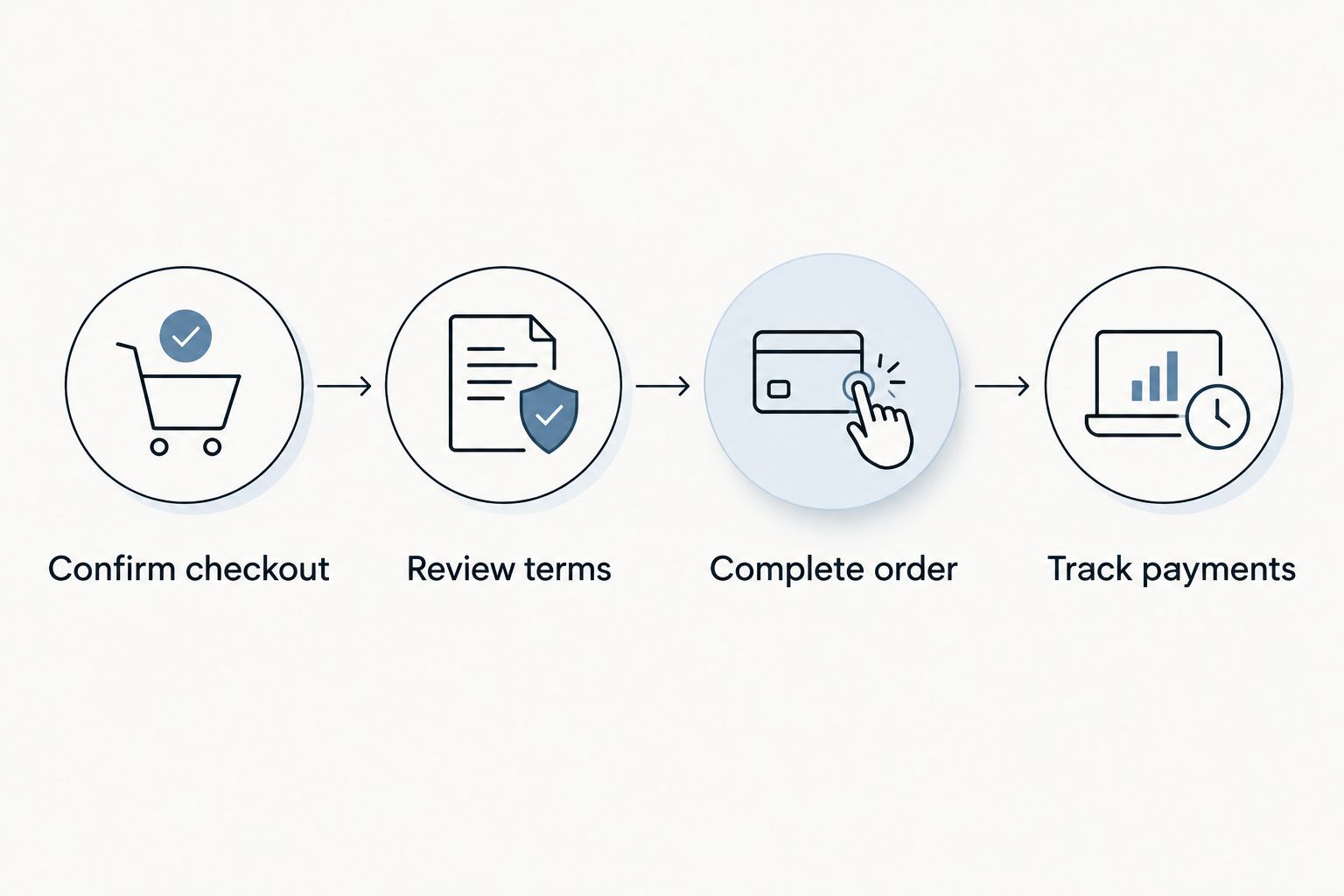
Instead of juggling ring details, loan screens, and payment dates, use this workflow to finance an engagement ring with Affirm: confirm that checkout offers Affirm, review your actual loan terms, then save your order and repayment details together. For a 2026 purchase from Balacia, verify the payment methods shown at checkout before treating financing as part of your proposal plan.
- To finance engagement ring with Affirm, first confirm that the retailer’s checkout offers Affirm for your purchase.
- Balacia offers engagement rings and custom design options; verify financing separately from your ring selection.
- Choose an engagement ring payment plan by total repayment and affordability, not the installment alone.
- Keep your jewelry order confirmation and Affirm loan agreement together; they serve different purposes.
Why this matters
An engagement ring carries emotional weight. The payment decision should not add uncertainty to the moment you are planning.
An affordable installment is not the same as an affordable loan. Review the borrowing cost, repayment schedule, and any payment required immediately before you agree. A longer repayment schedule spreads the obligation across more time; it does not establish that borrowing is the right choice.
Balacia is best for engagement-ring shoppers who want to explore both existing designs and custom design options. That choice belongs alongside—not inside—your financing decision: liking a ring does not make a particular loan suitable.
For your 2026 purchase, keep three decisions separate: the ring you want, the payment obligation you can manage, and the timing you need confirmed.
Before you start
- Prepare account access. Have access to your email, mobile phone, and the personal information Affirm requests during its application process. Enter your own accurate details and read the eligibility requirements presented to you.
- Finalize the purchase details. Confirm the ring selection, size, and any customization before reviewing financing. Write down your comfortable repayment limit after essential expenses and existing obligations.
- Check the non-obvious gotcha. A financing application, a loan offer, and a completed jewelry order are different stages. Do not assume that reaching an Affirm screen means your ring order has been placed, or that financing approval confirms a delivery date.
Set aside a place to keep the order confirmation and loan agreement. These are 2 separate records: one describes your jewelry purchase, while the other describes your borrowing obligation. Whether a jeweler can offer Affirm at all depends on its store software, since only some small business ecommerce platforms support installment providers at checkout.
Ring selection and checkout
Confirm the ring and payment route
- Open your chosen engagement ring and review the product details. Confirm the stone type, metal, ring size, and selected options from that specific listing rather than assuming the photographs establish every specification.
- Resolve custom-design questions before committing to payment. If you are exploring a custom ring CAD design mockup, ask what the design stage includes and how it connects to the finished-ring order.
- Proceed to checkout and review the complete order summary. Confirm that it describes the ring and options you intend to buy.
- Look for Affirm among the payment methods. Select it only if it appears for your checkout; do not assume that every ring or transaction has the same payment options.
- If Affirm is absent, pause this workflow. Ask the retailer which payment methods apply to your purchase instead of repeatedly submitting the order or assuming an alternative financing route will work.
Expected result: You have a defined ring order and a confirmed route into Affirm from that checkout. You have not yet accepted a loan simply by deciding to investigate financing.
During your 2026 checkout, use the information presented for that transaction. An old screenshot, another shopper’s experience, or a general financing article is not your loan offer.
Keep the purchase scope fixed
Avoid changing the ring while assessing the loan. Adding a wedding band or changing a stone creates a different purchase to evaluate, even when the checkout process looks familiar.
If you change the order, repeat the order-summary check before proceeding. The final ring configuration and the financing review must describe the same purchase.
Affirm application and loan review
Review the actual offer
- Follow the Affirm sign-in or application prompts presented by checkout. Interface wording varies by device and transaction, so use the prompts on your screen rather than searching for an assumed button name.
- Enter accurate information and complete any requested verification. Read the disclosures before authorizing the next stage.
- If Affirm presents an offer, review the annual percentage rate, finance charge, total of payments, repayment schedule, and any amount due immediately. Use the agreement’s own disclosures as your reference.
- Compare the payment obligation with your household budget. Review the next 3 months of expected expenses as a planning exercise, then consider obligations beyond that period for the full loan term.
- Read the information about credit inquiries and reporting. Do not treat an eligibility check and an accepted loan as interchangeable events.
- Accept only after the terms make sense without relying on hoped-for income, a future gift, or an assumed early payoff.
Expected result: You understand the obligation you are considering and can either accept it deliberately or leave checkout without forcing the purchase.
Choose the loan by its full repayment obligation, not by the smallest displayed installment. If the offer does not fit, stop. A proposal does not require accepting an uncomfortable debt.
Compare financing with waiting
Affirm is one possible payment route, not a reason to increase your ring budget. Before accepting, compare borrowing with setting money aside and purchasing later.
| Payment approach | Best for | Advantage | Trade-off |
|---|---|---|---|
| Affirm financing, when offered and approved | Shoppers whose disclosed repayment obligation fits their existing budget | Spreads repayment according to the accepted agreement | Creates a debt obligation; review borrowing costs and credit disclosures |
| Saving before purchasing | Shoppers who can separate their proposal timing from the ring purchase | Avoids taking out a purchase loan | Requires waiting and revisiting the ring decision later |
Neither approach establishes the quality of the ring. Stone documentation, materials, design details, and fit still require their own review.
For a 2026 engagement-ring purchase, waiting is the better choice when repayment would compete with essentials. Financing is a payment arrangement, not an affordability endorsement.
Order confirmation and repayment setup
Complete order
- Follow the checkout instructions after reviewing and accepting any financing agreement. If checkout returns you to the retailer, finish the remaining order steps.
- Look for an order confirmation and save it. Check the ring description, selected options, delivery details, and order reference against your intended purchase.
- Save the Affirm agreement and repayment schedule separately. Check that the borrowing details correspond to the transaction you just completed.
- Confirm production and delivery timing directly with the retailer before attaching the purchase to a proposal date. Loan approval does not establish when a ring will arrive.
Expected result: You have both a confirmed jewelry order and a clear record of the financing arrangement. If either record is missing, resolve that gap before placing another order.
Track payments
- Open your Affirm account and locate the purchase. Review the repayment schedule and the payment-management options shown for that loan.
- If you choose automatic payments, read the authorization and confirm the funding account. Do not assume automatic payments are enabled merely because you supplied payment information during checkout.
- Add 1 calendar reminder before each scheduled payment as a personal safeguard. Check your account even when automatic payments are enabled.
- Keep order-related correspondence with the purchase record. Save loan-related correspondence with the agreement so you can find the right reference quickly.
Expected result: You know when payments are due, how they will be made, and where to check the loan status.
For your 2026 records, keep the original agreement rather than relying only on a screenshot of an installment. The agreement contains the broader obligation.
Variant: financing a custom engagement ring
A custom design adds decisions before the payment stage. Balacia offers custom design options, but design approval and financing approval remain separate processes.
- Discuss the design scope, stone selection, metal, sizing, and approval process with the retailer.
- Ask how any design-stage payment relates to the finished-ring order. Do not assume separate stages share a payment arrangement.
- Confirm the final order details before evaluating financing for that transaction.
- Check whether Affirm appears at the relevant checkout. Review the actual offer rather than applying terms from an earlier purchase or design stage.
- Confirm production timing independently after the required design and order approvals.
Expected result: Your payment decision matches the specific custom-order stage you are authorizing. You are not borrowing against an assumed final design or an unconfirmed proposal deadline.
The advantage of custom design is the opportunity to discuss a more personal ring. The trade-off is additional decisions and approvals before you have a defined finished-ring order.
Troubleshooting
Affirm does not appear at checkout
Do not assume the payment method applies to your transaction. Confirm the ring configuration and ask the retailer about the payment methods offered for that order; avoid creating duplicate purchases while investigating.
The application is declined or the offer is unsuitable
Read the explanation and instructions Affirm provides. Stop the purchase if the offered obligation does not fit your budget; switching to another borrowing method does not solve an affordability problem.
Financing appears complete, but no order confirmation arrives
Check your email and account records, then contact the retailer with the transaction details. Check the loan status with Affirm separately before attempting checkout again, so you do not mistake a missing email for a failed transaction.
The ring order changes after financing
Contact the retailer about the order change and Affirm about the associated loan status. Do not assume that a design adjustment, cancellation request, or return automatically changes the next payment shown in your account.
A refund is pending while a payment is due
Check Affirm’s current instructions and the repayment status for your loan. Do not stop scheduled payments solely because you requested a refund; confirm how the refund affects your obligation through Affirm.
Customize your workflow
Create a purchase folder with separate sections for ring specifications, order correspondence, and financing documents. This keeps a romantic decision from turning into a search through unrelated messages.
If you are shopping together, agree on the ring priorities before reviewing payment plans. If the proposal is a surprise, separate private proposal planning from financial information that affects a shared household.
For Balacia engagement rings, use product-specific details to settle the jewelry decision and the actual financing disclosures to settle the borrowing decision. Neither replaces the other.
FAQ
How do I finance an engagement ring with Affirm?
Confirm that the retailer offers Affirm at checkout, complete the application prompts, and review any offer before accepting. Finish the retailer’s order process and save both the order confirmation and loan agreement.
Can I use Affirm for a Balacia engagement ring?
Verify whether Affirm appears at checkout for your specific Balacia engagement-ring purchase. Confirm the payment route before making financing part of your proposal plan.
Does checking Affirm eligibility affect my credit?
Affirm states that checking eligibility does not affect your credit score. Review the disclosures for the specific financing product, because accepting and managing a loan is separate from checking eligibility.
Is Affirm financing guaranteed for an engagement ring?
No, financing is subject to eligibility and approval. A retailer showing Affirm does not guarantee approval or a particular repayment offer.
Can I finance a custom engagement ring with Affirm?
Use Affirm for a custom engagement-ring transaction only when the relevant checkout offers it and your application is approved. Confirm how design-stage payments and the finished-ring order are handled before proceeding.
Does Affirm approval mean my ring order is complete?
No, financing approval alone does not confirm that the retailer has completed your ring order. Save the retailer’s order confirmation and verify production and delivery timing separately.
What happens to my Affirm loan if I return the ring?
A return request does not by itself establish that your loan balance or next payment has changed. Follow the retailer’s return process and check Affirm’s instructions and account status until the adjustment is reflected.
One last thing
A loan approval is not a proposal-date guarantee. Before planning the moment around the ring, confirm the order, any design approvals, and the delivery timing with the retailer.
The most useful final check is simple: you should be able to explain the ring you ordered and the repayment obligation you accepted without reopening a sales message. If either remains unclear, pause and ask.